
The most expensive WooCommerce permission is often “Shop manager” with a full wp-admin login. That role can process orders. It can also preview themes, trip over permalinks, and install a “helpful” plugin from a YouTube comment.
If you have searched for woocommerce sales without dashboard or woocommerce frontend dashboard, you already know the brief: let people sell and fulfil without handing them the WordPress backend.
Why the default dashboard is the wrong tool for sales staff
WordPress admin is a CMS control panel. WooCommerce hangs store screens off that panel. The result is a left-hand menu that mixes:
- Orders, products, and customers — the work
- Marketing, analytics, and extensions — sometimes the work
- Appearance, plugins, users, and settings — almost never the work for a packer or support hire
Even a well-locked-down shop manager role still looks like WordPress. New hires ask for a tutorial on “the dashboard” when they only needed a queue of processing orders.
Three ways teams try to hide wp-admin
1. Role and capability plugins
You can strip menus with a user-role editor. This is worth doing anyway. It does not give you a better order UI. It just hides the sharp edges. Staff still land on a WooCommerce list table designed in 2011.
2. Multi-vendor / frontend manager plugins
WCFM, YITH Frontend Manager, and similar tools are built for marketplaces and vendor self-service. They are the right hammer if you have dozens of sellers. They are a lot of surface area if you have one store and three people who need to pack boxes.
3. A dedicated WooCommerce admin on a frontend URL
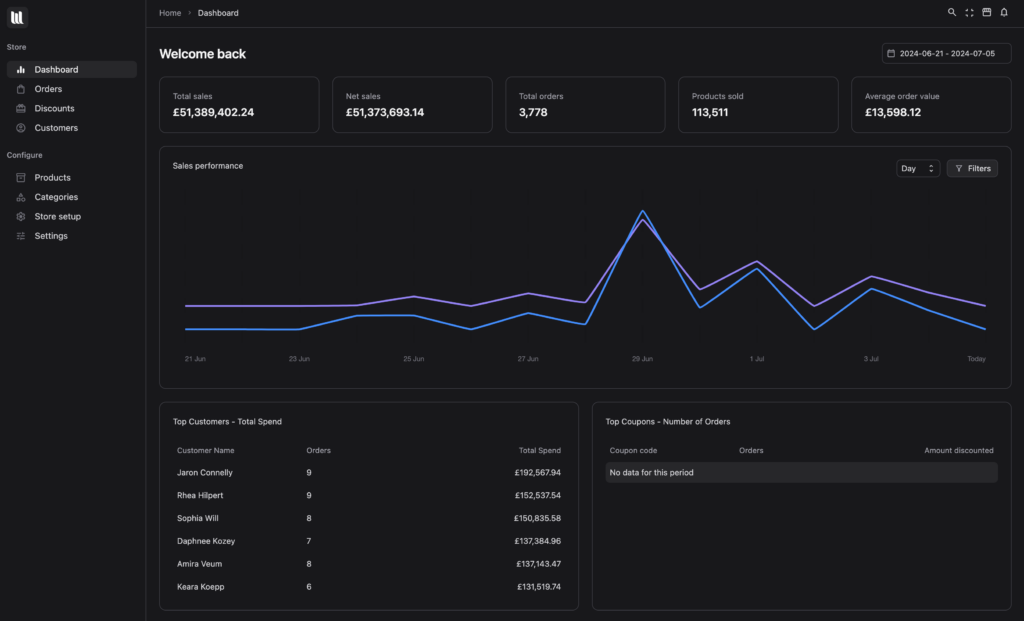
This is the model we built for. Load VendBase on a page you control. Staff authenticate, they see orders / customers / products, they never see Plugins or Appearance. Developers keep /wp-admin.
What a frontend WooCommerce dashboard should still do
Hiding the backend is not enough if the replacement is a thin “my account” clone. Sales and fulfilment still need:
- The same data. Orders, refunds, subscriptions, and customers must be WooCommerce’s, not a parallel database.
- Search that works. Email, order number, SKU, and customer name from one field.
- Status changes that stick. A drag on a kanban card should update the real order status.
- Live updates. New checkouts should appear without a refresh during a flash sale.
- Role awareness. A shop manager should not become an administrator because the UI lives on the frontend.
VendBase is that layer. It is a WooCommerce admin replacement, not a second store. White-label is included if you are an agency handing the URL to a client’s warehouse.
A rollout that does not scare your developer
- Install VendBase and confirm orders, products, and subscriptions look correct in the new UI while you are still inside wp-admin.
- Create a blank page (or a custom URL) and enable frontend loading in VendBase settings.
- Give shop managers that URL. Leave their WordPress accounts as shop manager — do not upgrade them.
- Optionally block
/wp-adminfor that role with a small redirect. Test password resets and “view order on site” links. - Walk the warehouse through the order kanban once. Most teams stop asking for the old table within a week.
We published a shorter setup walkthrough when the feature launched: How to load WooCommerce admin on the frontend.
When you should not hide the dashboard
Keep wp-admin in the loop for anyone who edits themes, payment gateways, or tax classes. A frontend dashboard is for operations. Store configuration still belongs with the people who understand hooks and staging.
If your search was literally “woocommerce sales without dashboard”, the honest answer is: you still need WooCommerce. You do not need to put every hire in front of it. See VendBase pricing — one payment, lifetime updates.