
WooCommerce 10.5 landed in early February 2026 with a clear brief: stop analytics and the admin from falling over on busy stores. The official release notes put scheduled imports, a quicker Recent Reviews widget, and experimental caching at the centre of the story.
That work is real. It is also incomplete if your shop managers still spend their day inside the default WooCommerce backend.
What WooCommerce 10.5 actually shipped
Scheduled analytics imports
New stores now batch-process report data — 100 orders at a time, every 12 hours — instead of spawning a background job for every order event. Existing sites have to opt in under Analytics settings. You can still trigger a manual refresh when a board meeting cannot wait for the next batch.
If you have ever watched Action Scheduler chew through a sale weekend, this is the headline. Reports stay accurate without pinning the database to a per-order import.
A slightly faster WooCommerce admin
The Recent Reviews widget was rewritten to load far quicker (Woo’s own notes claim up to 98%). Unnecessary scripts were stripped from some admin pages. Variation price calculations cache more efficiently. None of that redesigns the orders table; it just stops the chrome from being quite so expensive.
Checkout and catalogue polish
Multi-package shipping is clearer at checkout — useful for subscriptions and split shipments. Product permalinks that include a category now prefer the most specific term, which is a quiet SEO win. Variable products keep Add to cart disabled until options finish loading, which avoids a class of “wrong variation” tickets.
Experimental caches
REST API caching and product object caching shipped behind feature flags. Test them on staging. They are aimed at API and storefront latency, not at giving a warehouse lead a better order screen.
Why a faster widget is not a better WooCommerce admin
10.5 makes the default dashboard cheaper to render. Store teams still open the same list tables. They still lose context when they click into an order. They still cannot see fulfilment as a board. They still share wp-admin with people who should never see Plugins.
That gap is why queries like woocommerce admin, woocommerce backend, and woocommerce demo admin keep showing up in search. Merchants are not looking for another reviews widget. They are looking for an operations surface.
What we would pair with 10.5
Keep WooCommerce 10.5 (or the 10.5.1 follow-up if you hit the REST cache fatal). Turn on scheduled imports if you are an existing store and your reports can tolerate a 12-hour cadence — or refresh manually before you export.
Then give the people who process orders a workspace that matches the new analytics story:
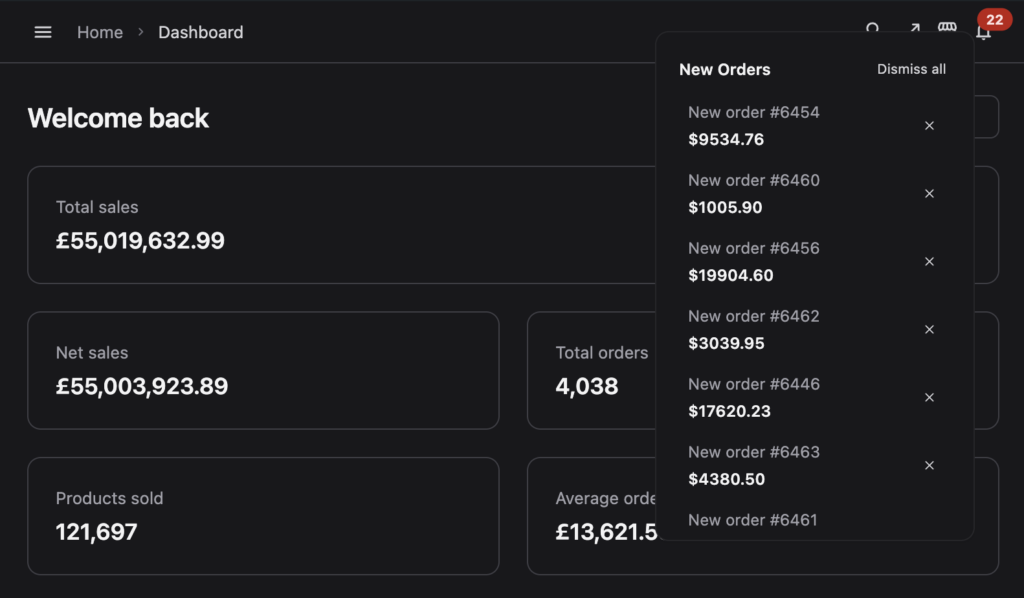
- A dedicated WooCommerce admin with global search, customisable tables, and dark mode
- Order kanban so processing / packing / on-hold is visible without filters
- Live order updates so a new checkout does not depend on hitting refresh
- Optional frontend loading so shop managers never need the full WordPress menu
VendBase reads the same orders, products, customers, and subscriptions. WooCommerce stays the source of truth. 10.5’s import pipeline and HPOS data still apply — you are only changing the chrome the team looks at.
A practical update checklist
- Update on staging, including any custom analytics or reporting plugins.
- Decide whether to opt existing stores into scheduled imports.
- Leave experimental REST / product object caches off until you have load-tested them.
- Walk a shop manager through one peak-hour orders session. If they still say “the backend is the slow part”, the remaining work is the interface, not the import cron.
WooCommerce 10.5 is a good release for high-volume stores. Pair it with an admin your team will actually enjoy using. VendBase is a one-time licence — lifetime updates, every feature included.